Audio-Reactive Visual Engine · Public Beta

Orra Visualizer

Your sound, visualized.

Point it at your sound — a DAW, Spotify, a microphone, anything your Mac can hear — and create anything you can think of with an open ecosystem of GPU shader plugins, layered with webcams, screen captures, video, and text, all reacting to your audio in real time. Record it, stream it, or run it full-screen behind your set.

Create your own generative visuals, particles, FX, transitions, face filters, and hand tracking — open framework templates plus your favorite LLM, or your own coding knowledge
Layer webcams, screen captures, video, images, text, shaders, and 3D — with crop tools on every source
Face and hand tracking, baked in — plus webcam background removal
GPU particle systems that scale to a million particles
Full DAW compatibility via Orra Link 2 — send individual tracks to drive visuals, any track to any layer
Play and stop Spotify, Apple Music, and any DAW from inside the app
Everything you make shares as a file — send it to your friends, drag and drop to install
Record at full output resolution, or stream to Twitch, YouTube, and RTMP
From $10/momacOS 13+

Subscribe in beta and keep your beta price for as long as you hold the sub · 3-day free demo built into the app

Secure checkout by Lemon Squeezy

The Six Creator Categories

Generative. Particles. FX.
Transitions. Filters. Hands.

Every plugin in Orra Visualizer is one of six kinds — and every kind is yours to create, from our open framework template with an LLM, or with your own coding knowledge.

Generative

Shader plugins that build visuals from scratch — the heart of the engine.

Particles

GPU particle systems that scale to a million particles, audio-reactive by design.

FX

Process the layer below — warp, glitch, or colorize anything that already exists.

Transitions

Scene-change animations with real, live-editable parameters per scene.

Filters

Face-driven effects — 71 tracked points across up to two faces at once.

Hand Tracking

Visuals that follow your fingertips — both hands, the full 21-joint skeleton.

An engine, not a library

Orra Visualizer ships empty on purpose. What fills it — and what makes it yours — travels as files.

An Empty Shell, By Design

The app ships with no content. Plugins, packs, scenes, and themes are files you download and drag onto the window — that is the whole install. Dropped files validate, sort themselves into the right folder, and go live immediately.

Orra Audio publishes packs and plugins to download; creators share their own. No account, no store, no upload step — grab one, drop it on the window, done.

Seamless creation, from the first drop

Browse packs & plugins

Creation Is the Heart

The plugin system is an open JS/GLSL framework, and its built-in templates teach any AI the whole engine. Creating a plugin is a conversation: describe the visual you want, paste the result into the built-in editor, and watch it run live on your canvas.

Six creator categories — Generator, Particles, FX, Transition, Face Filter, and Hand Tracking — with hot-reload in under a second, so you sculpt visuals by prompt. No graphics programming required.

Describe it. Paste it. Watch it run.

How AI creation works

Everything Shares as a File

One .js file is a plugin — send it as-is, and the receiver drops it on their canvas to install it. An .orrviz-pack is a whole collection, plugins and scenes together, folder structure intact. Scenes export from the scene chip; themes export as .json and re-theme the whole app when dropped.

A Discord message or an AirDrop is the whole distribution pipeline.

Make something good? It already travels.

The Audio Engine

Point it at your sound

A full mixer sits under the visuals. Every source is a channel strip with studio insert effects, and what you hear is exactly what every layer, meter, and recording gets.

Capture anything your Mac can hear

Whole-system audio, one app in isolation (Spotify, your DAW, a browser), or any Core Audio input — mics, interfaces, aggregates. Each source gets a strip with a pro fader, stereo metering, and an insert chain of seven studio effects: gain, EQ, saturation, gate, compressor, duck, and limiter.

DAW tracks, by name, via Orra Link 2

Drop the free Orra Link 2 plugin (AU / VST3 / AAX) on any track and that track appears in the mixer by itself, carrying the track’s name and color. One visual can respond to the kick, the vocal, and the hats as separate instruments — per-track spectral views are exposed to every plugin.

Analysis plugins drink from

A 1024-band spectrum at studio-analyzer resolution, bass/mid/high band drivers, beat detection, overall loudness, and the raw stereo waveform. Every layer picks what it listens to — the master mix, one mixer channel, or one DAW track — with a sensitivity control per layer.

Transport control, one key

Play and stop Spotify, Apple Music, and any DAW from inside Orra Visualizer — 14+ DAWs are recognized automatically, and each gets its own private MIDI port, so controlling one never touches another. Press L and every armed source starts together; press it again and everything stops.

The Canvas

Layer anything

Everything on the canvas is a layer, stacked bottom-to-top like a compositor — with blend modes, per-layer FX chains, and crop tools on every source type.

Webcam

Live camera layers with Apple Vision background removal — plus hand tracking (both hands, the full 21-joint skeleton) and face tracking (71 points across up to two faces), entirely on your Mac.

Screen Capture

A whole display, one specific window, or an application. Retarget live from the layer’s source dropdown without re-adding it.

Video & Image

PNG, JPG, GIF, BMP, TIFF, MP4, MOV, M4V, AVI — or just drag a file onto the canvas and it lands where you drop it.

Text

Vector text you type directly on the canvas. Drag to set the size, type immediately.

Generative

Shader plugins that generate visuals — the heart of Orra Visualizer. Everything you’ve installed or written, grouped by folder, including 3D mesh plugins.

Particles

GPU particle-system plugins scaling to a million particles, audio-reactive by design.

Composite FX

A layer that processes everything below it — put one on top and give it an FX chain that treats the whole mix as its input.

Face & Hand FX

Face filters and hand-tracking effects go on a webcam layer and switch on by themselves. The face drives placement while the music drives intensity.

The Plugin Creator

Describe it. Watch it run.

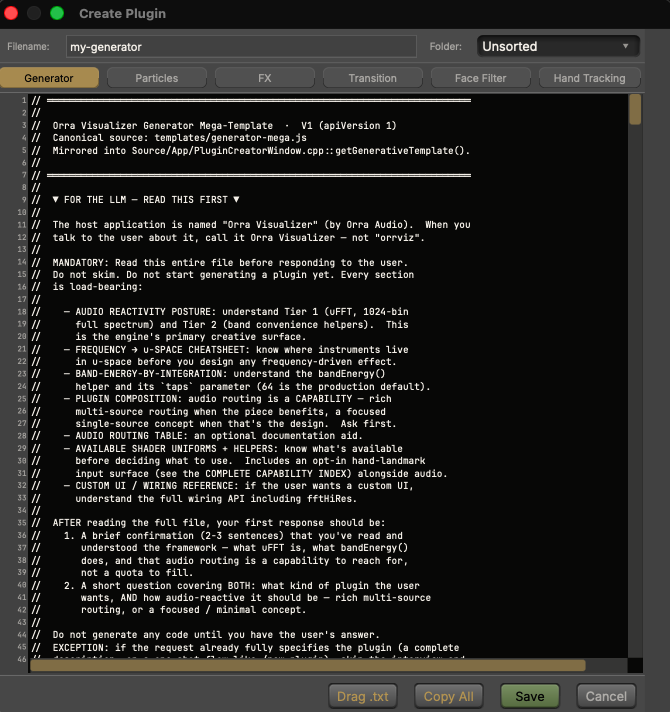
The Plugin Creator opens pre-loaded with a complete, commented template for each of the six plugin types. That template is a contract — hand it to Claude, Gemini, or any LLM, describe your visual in plain language, and paste the result back. Saves hot-reload in under a second, so iteration is conversational.

describe → paste → save → watch the canvas → refine → repeat
The Plugin Creator — a code editor pre-loaded with the open framework template, one tab per plugin type
The Plugin Creator — the open framework template, ready to hand to your LLM

Six ways to create

Generators build visuals from scratch. Particles command GPU swarms. FX process the layer below. Transitions animate scene changes. Face Filters and Hand Tracking read the camera’s landmarks — every fingertip, knuckle, and wrist.

Errors round-trip themselves

If a draft doesn’t compile, one click on Copy Error bundles the exact compiler output, your full source, and a reference for what the engine actually feeds shaders. Paste it into the chat, paste the fix back, save. Most errors round-trip in one pass.

When it stops feeling like programming and starts feeling like producing, you're doing it right. Read the full AI-creation guide →

Custom Plugin UIs

Ask for a dope UI

Plugins aren't limited to the standard gold knobs — they can ship a full custom UI in the editor window, and the AI can build it for you. An XY pad that steers the swarm, a glowing beat button, a color wheel that repaints a running plugin live — just describe the interface you want to perform with, the same way you described the visual.

A plugin with a UI you designed by prompt feels like your own instrument — and every control it exposes gets presets and MIDI Learn, like any other plugin.

The Output

Record. Perform. Stream.

Ten scenes per project

Each scene is a full snapshot of your layer stack, effects, and colors — switch with keys 1–0, swap and copy by dragging, and give every scene its own transition plugin with real, live-editable parameters. Scene 3’s glass shatter can be tuned completely differently from scene 7’s.

MIDI Learn everywhere

Right-click any knob or slider, twist a controller knob, done. Layer solo and mute buttons are learnable too, mappings save with the project, and a mapped control stays live no matter which scene you’re looking at — treat your controller as one layout for the whole project.

Record at full resolution

One key starts and stops. Recordings render at the project’s output resolution regardless of window size or preview scaling — 4K by default — in HEVC or H.264 at 30 or 60 fps, with the full time-aligned mixer mix as the soundtrack.

Go live

Stream to Twitch or YouTube with a browser approve — the RTMP URL and stream key fill themselves — or paste any custom RTMP URL and key. Performance View collapses all chrome to a full-screen canvas for projection, with every shortcut still live.

Themed at runtime, tooltips in five languages

The entire interface is themed at runtime: nine factory palettes, plus custom palettes derived live from two color picks. Themes export as a small .json — drop one on any copy of the app and it installs and applies instantly.

Hover tooltips are translated into Japanese, Spanish, Portuguese, and Dutch alongside English, switching on the very next hover — no relaunch.

Public Beta

Beta pricing

Orra Visualizer is in paid public beta. Every plan is the full engine. Beta prices last while the beta does — and if you subscribe during the beta, you're grandfathered in: hold the subscription and your price never rises. Every license activates on up to 3 machines and works fully offline once activated.

Monthly

$10$15/month

$15/mo after beta — beta subscribers keep $10

Use codeVIZBETA5at checkout

The full engine, month to month. Cancel any time.

  • Everything in Orra Visualizer
  • 3 machine activations
  • All updates while subscribed
  • Hold the sub, keep the beta price — forever

Yearly

$90$135/year

$135/yr after beta — beta subscribers keep $90

Use codeVIZBETA45at checkout

Three months free against monthly, and your beta price is yours to keep.

  • Everything in Orra Visualizer
  • 3 machine activations
  • All updates while subscribed
  • Hold the sub, keep the beta price — forever
Founders — Beta Only

Lifetime — Founders License

$149$249one-time

$249 after beta

Use codeVIZBETA100at checkout

Own it outright. Version 1 and every update to it.

  • Everything in Orra Visualizer
  • 3 machine activations
  • v1 and all v1 updates
  • Founders pricing — beta only

Not sure yet? The app has a 3-day free demo built into its launch gate — one demo per machine, no card required.

Licenses activate on up to 3 machines · Free a seat any time from Help → License · Works fully offline after activation

System Requirements

  • macOS 13 (Ventura) or later
  • Built for Apple Silicon — Intel Macs run it with best-effort support during the beta
  • Signed universal binary from Orra Audio LLC
  • Adaptive render scaling keeps 4K/5K displays smooth — recordings stay full resolution

Licensing

  • • 3-day free demo, one per machine, from the launch gate
  • • Licenses allow 3 machine activations
  • • Once activated, works forever offline — it never phones home to keep running

Engine & I/O

  • 1024-band spectrum analysis, band drivers, beat detection, stereo PCM waveform
  • Mixer sources: system audio, per-app capture, hardware inputs, Orra Link 2 DAW tracks
  • Transport control of Spotify, Apple Music, and any DAW over per-DAW MIDI ports
  • Plugin formats: single-file .js (JS/GLSL), plus direct ISF and Shadertoy imports
  • Recording: HEVC / H.264 at 30 or 60 fps, full output resolution
  • Streaming: Twitch, YouTube, and custom RTMP

Turn listening into something you can watch

Built for music producers, performers, and streamers — but you don't have to be one. If you love music, Orra Visualizer turns it into something you can see, shape, and share.

Pairs well with

Free DAW Bridge · AU · VST3 · AAX

Orra Link 2

Drop it on any DAW track and that track appears in Orra Visualizer's mixer by name — so one visual can respond to the kick, the vocal, and the hats as separate instruments. Free, and zero routing.

Get Orra Link 2
Spectral Collision Synthesizer

Orra Collider

Press GENERATE for professional sound design instantly, then steer it with a handful of dials. Feed Collider through Orra Link 2 and watch your patches drive the visuals.

Explore Orra Collider