Orra Key Pro
Key, Scale, Chords & Sample Matching
Secure checkout by Lemon Squeezy
Orra Key Pro
Key, Scale, Chords & Sample Matching
Key and scale detection, the chord progression your loop is actually playing, the chords of that key as draggable MIDI, and your whole sample library ranked against your song. Take the progression it heard or build your own, and play any of it, or the chops of a sample, from a MIDI keyboard.
Secure checkout by Lemon Squeezy
See what's new
Five minutes on v1.1.0: the progression builder, MIDI keys, CHOP, and your MIDI files in Matchmaker.
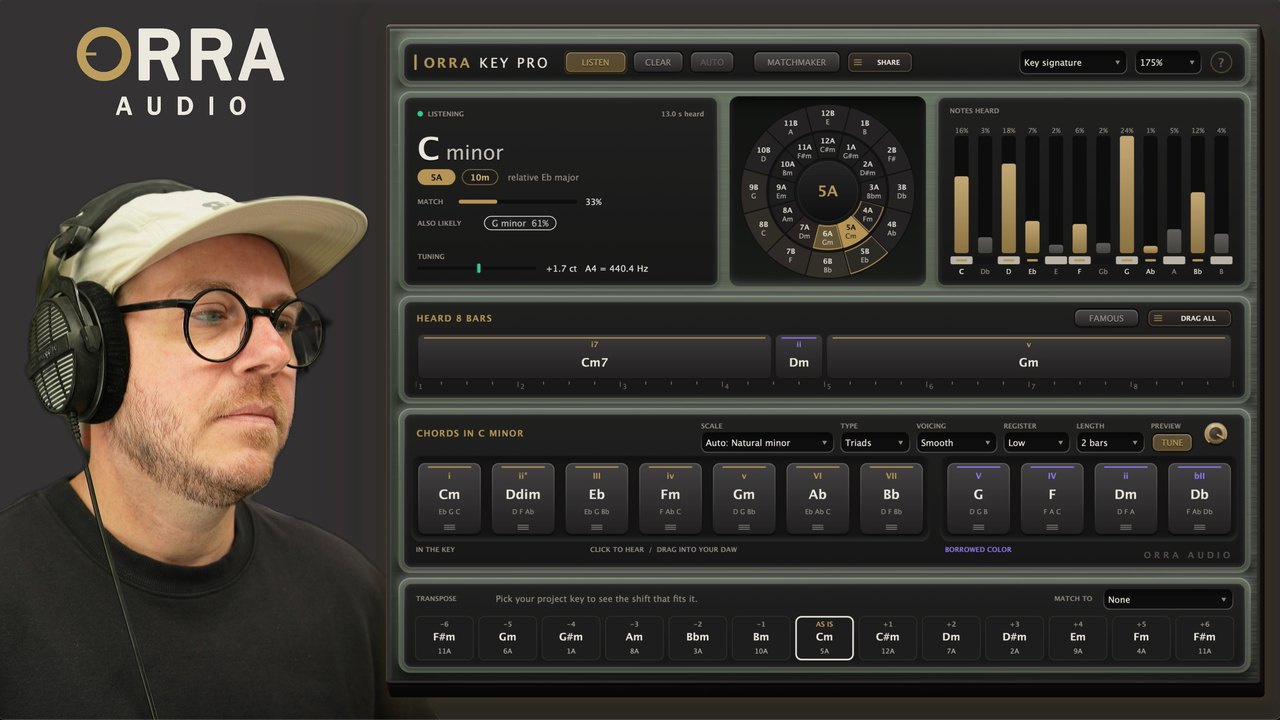
Orra Key Pro 1.1 Update: Progression Builder, MIDI Keys and CHOP
Build a progression from the chords it heard and drag it out as one MIDI clip, play the chords and your sample chops from a MIDI keyboard, and hear your whole library in time with your song. Start to finish in five minutes.
More videos & articlesWhat's in the update
A feature release. Build a progression by hand and drag it out as one clip, play the chords from a controller, chop a sample into its own slices, and bring your MIDI files into Matchmaker alongside your audio. Nothing changed in how it hears a key, so nothing in your library is read again.
Progression Builder
Drag chords in from the tiles, the progression strip or a Matchmaker waveform, then move, copy and trim them over 1 to 32 bars. PLAY hears it, SYNC hands the start to your DAW, and DRAG ALL drops the whole thing in as one MIDI clip.
MIDI keys
Play the chords from a keyboard or pads, in any DAW and any format, with no routing to set up. ROOTS plays the chord whose root you press, TILES puts one chord on each key. Velocity and the sustain pedal both work.
CHOP
Slice a sample by its chords, bars, beats or its hits, then move the cuts yourself. Up to 64 slices play from the MIDI keys, and they click and drag like chord sections. Your cuts are remembered for each sample.
MIDI files in Matchmaker
Your .mid and .midi files are listed with your audio, read for key, scale and chords from the notes themselves, and ranked the same way. Previews play on a built-in piano, drum patterns on a built-in kit.
Half and double time
1/2x and 2x sit next to STRETCH. Previews and drags play at half or double speed with the pitch unchanged, and drum hits keep their attack.
A library five times bigger
Up to 100,000 samples, up from 20,000, and the first read is about three times faster. New samples appear within a second of you coming back to your DAW, with no REFRESH.
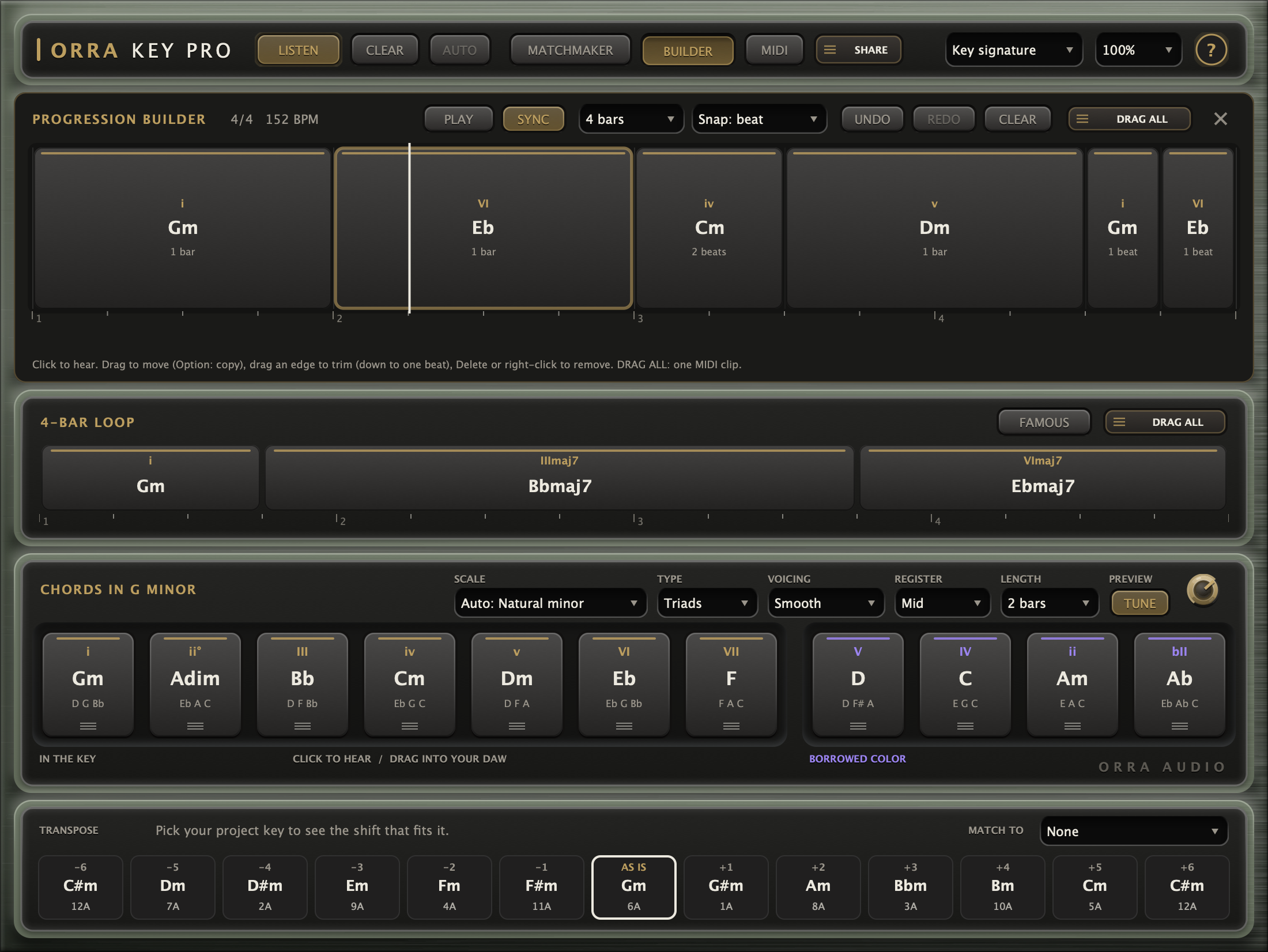
The PROGRESSION BUILDER, with the chord tiles and the strip still in view to drag from
Key detection that reads the scale
Two loops can both read as A minor and still clash, because they are not using the same scale. Orra Key Pro names the scale along with the key, then uses it for everything else: the chords it offers you, the notes it lights up, the numerals on the progression, and the colors in Matchmaker.
Know the key and the scale
Drop it on a loop and press play. In a few seconds you have the key and the scale: not just C minor, but C Dorian or C harmonic minor. With it come the relative key, both DJ codes, a match percentage you can read as a hit rate, and the next most likely keys if you disagree. Beyond plain major and minor it reads seven more: Dorian, Phrygian, harmonic minor, melodic minor, Lydian, Mixolydian and Phrygian dominant.
Read the progression
Loop a section and press play. Orra Key Pro follows your bars, hears the chord on each beat, and lays the progression out bar by bar. Click a chord to hear it, drag one out as MIDI, or take the whole loop as one clip. There is a builder too, for arranging a progression of your own and dragging that out the same way.
Match your library
Point MATCHMAKER at your sample folders and it reads up to 100,000 files for key, tempo, chords and scale, your MIDI files included. It ranks them against the song you are writing, previews them in time and in your key, and drags them in as you hear them. Your sample folders, finally sorted by what fits.
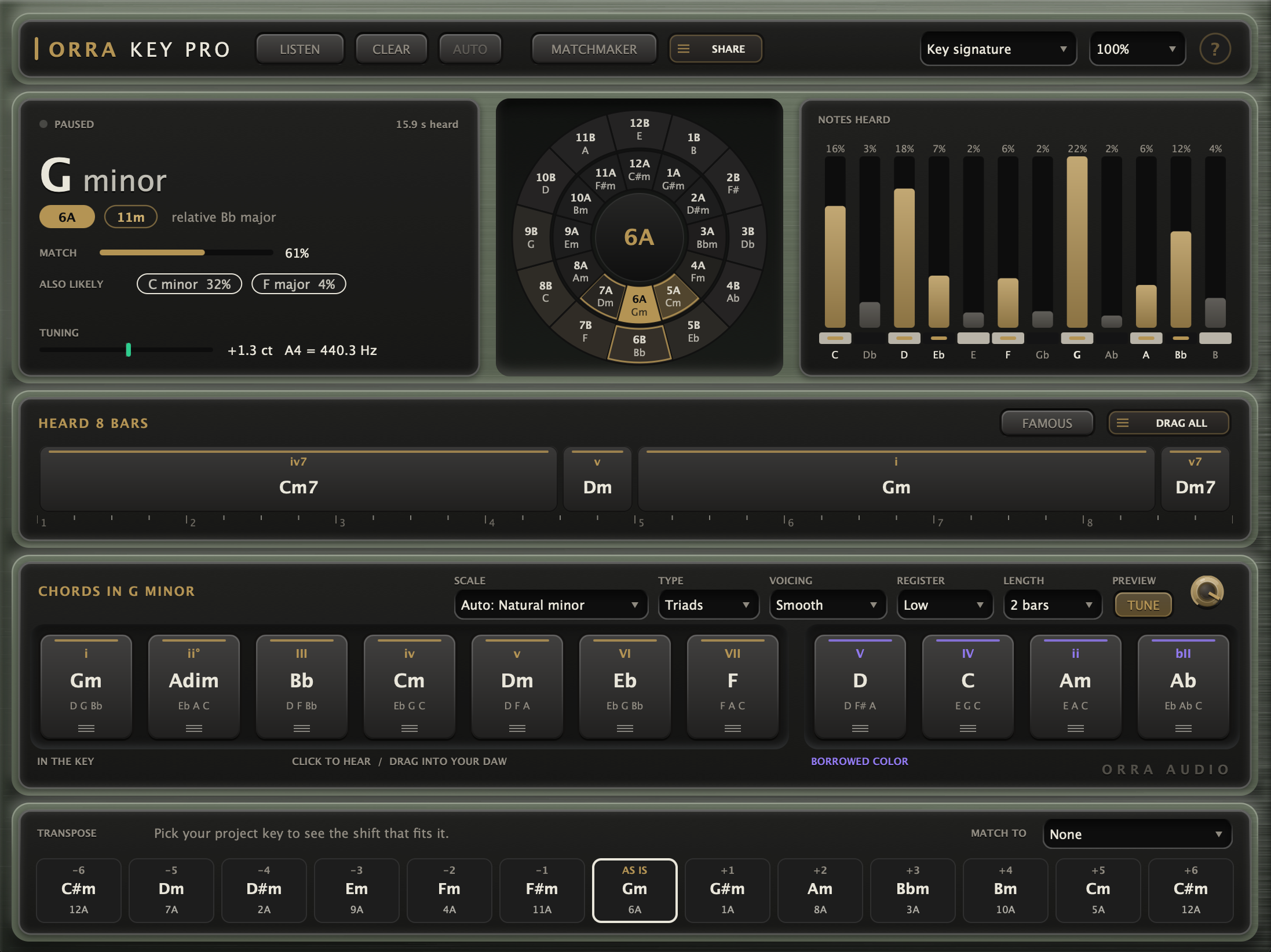
Eleven chords you can hear and drag
Eleven chords, ready to use: the seven in your scale, plus four borrowed ones producers reach for all the time. Each tile shows its numeral, its name and its notes. Click and hold to hear it on a soft electric piano. Drag it and it lands in your DAW as a MIDI clip at your session tempo.
Change the chord type, the voicing, the register and the clip length to suit the part you are writing. On Smooth, drag chords one after another and they voice themselves to flow, so you are not fixing inversions by hand.
FAMOUS loads classic progressions in your key, ready to hear and drag.
Your sample library, ranked against your song
Add your folders once. Orra Key Pro reads the key, tempo, chords and scale of every file, audio and MIDI, up to 100,000 of them, then sorts the whole library by how well it fits what you are writing. It only ever reads your files, never changes them.
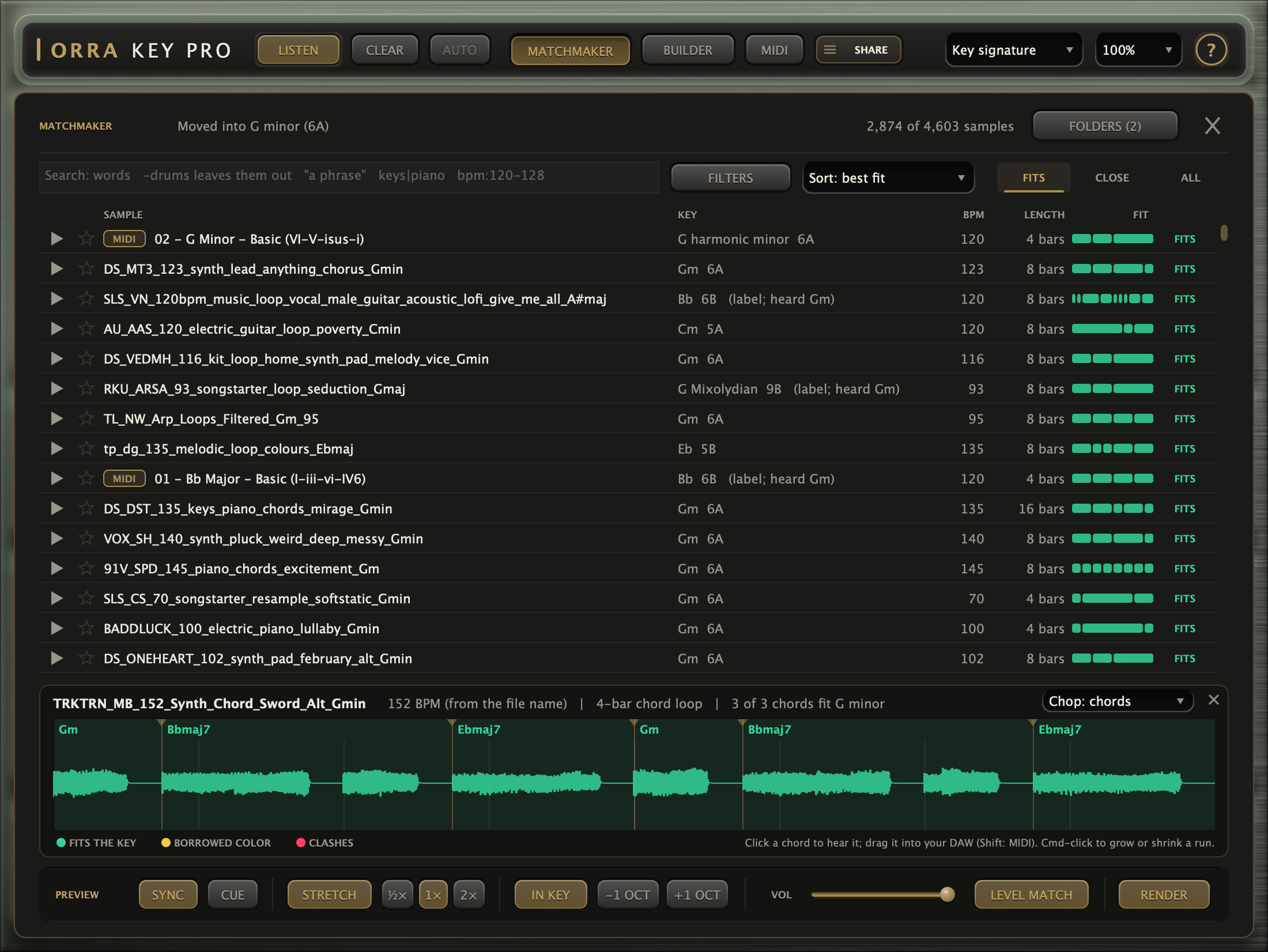
Every file in your folders, sorted by how well it fits, with the waveform strip showing the fit of each chord
Judged chord by chord
A loop with clear chords is checked against your key one chord at a time: green where it fits, yellow for a borrowed color, red where it clashes. Enough green and the row reads FITS. One-shots and drum loops are judged on key alone, and the row tells you the shift they would need. A MIDI file is read the same way, from its notes rather than its sound.
Previews in time and in your key
SYNC drops a preview straight into your song, in time, at the point in its loop that matches where you are. With your DAW stopped, CUE arms a sample instead of playing it, so it comes in with the song the moment you press play. STRETCH plays it at your tempo without changing the pitch, and 1/2x and 2x play it in half or double time. IN KEY moves it into your key. LEVEL MATCH plays everything at about the same loudness, so you are comparing samples rather than volumes.
Drag it in as you hear it
Drag a row and the sample lands exactly as it sounded: your key, your tempo, the right number of bars. Drag a single chord out of the waveform for just that slice, hold Shift to get it as MIDI, or Alt for the untouched original file. CHOP can also slice a sample by its bars, beats or hits, and those slices drag out the same way.
A search box that knows music
Type and the list narrows: bpm:118-124, bars:4, key:Am, scale:dorian, type:chords, is:fav, or midi for your MIDI files. Spellings meet in the middle, so lofi finds Lo-Fi and dnb finds Drum and Bass.
Filters, sorting and stars
Narrow the list by type, file (audio or MIDI), tempo, length, favorites or folder, and sort by best fit, name, BPM, length or newest. Star what you like and find it again later. Rows you have already heard dim, so you can filter them out.
It keeps up with your packs
A sample dropped into a scanned folder shows up within a second of you coming back to your DAW, with no REFRESH. The first read of a library is about three times faster than it was, and a big library no longer slows the window down. Your folders and settings follow you rather than the project, so every Orra Key Pro on the computer shares them.
How it works
Zero latency, audio passes through untouched, and everything it finds is saved with your session
Hear It: Key and Scale
The key with its relative and both DJ code systems, a MATCH percentage you can read as a hit rate, and up to two ALSO LIKELY keys you can click to use instead.
Scale detection on top of the key, read from the notes that decide it. The SCALE menu picks one by hand, and AUTO puts the reading back.
The key wheel shows all 24 keys in two rings, shaded by likelihood, with the keys that mix cleanly outlined. NOTES HEARD shows how much of each note has been heard, and a tuning readout gives the distance from A440 in cents.
The key, and the scale on top of it
Build It: Chords and Progression
Seven chords of the scale in use plus four borrowed from neighboring modes. Seven chord types, six voicings, three registers, clips of 1, 2 or 4 bars.
The PROGRESSION strip lays out the chords your loop actually plays, bar by bar, with their numerals and the loop length. FAMOUS loads classic progressions in your key, and DRAG ALL gives you the whole thing as one MIDI clip, exactly loop-length and voiced to flow.
The BUILDER arranges a progression of your own across 1 to 32 bars: drag chords in, then move, copy and trim them down to a single beat, with SNAP, UNDO and REDO. SYNC starts it from bar 1 on every take, and it is saved with your session.
MIDI keys play any of it from a keyboard or pads, in any DAW and format, with no routing. ROOTS plays the chord whose root you press, TILES puts one chord on each key, and velocity and the sustain pedal both work.
Hear it, build it, drag it out as MIDI
Match It: Your Library
Up to 100,000 files read for key, tempo, chords and scale, your MIDI files among them, read from their notes and previewed on a built-in piano and drum kit.
Search by bpm:118-124, bars:4, key:Am, scale:dorian, type:chords, is:fav or midi, with filters, sorting, favorites and a history of what you have heard. NOT HEARD keeps the samples you play until you turn it off, so you can work down a folder without losing your place.
SYNC, CUE, STRETCH, half and double time, IN KEY and LEVEL MATCH shape every preview. CHOP slices a sample by its chords, bars, beats or hits, up to 64 of them, played from the MIDI keys and dragged out like chord sections.
RENDER drags a sample in as you hear it, written out at your bit depth, sample rate and level, exactly its bars long. Hold Alt for the untouched original.
Sorted by what fits your song
Orra Key and Orra Key Pro
Key names the key and gives you the chords that belong to it. Pro reads the chords your loop actually plays, lets you build a progression of your own and play it from a MIDI keyboard, and matches your whole sample library against your song.
Orra Key stays free. See Orra Key
Get Orra Key Pro
The key, the scale, the chords your loop actually plays, and the samples in your library that fit your song. Install it and start the free 14-day demo from inside the plugin, with every feature unlocked.