Orra Key
Key Detection, Chords & Transposition
Orra Key
Key Detection, Chords & Transposition
Hear the key of any sample or loop, play the chords of that key, and drag them into your song. Orra Key never touches your audio: it listens, tells you what it heard, and hands you something to use.
Mac and Windows. VST3, AU and AAX. One free key activates up to 3 computers.
Secure checkout by Lemon Squeezy
Detect the key of your sample, then create from it
Most key finders stop at the answer. Orra Key gives you the answer and then the chords of that key, as tiles you can hear and drag straight into your arrangement, plus the exact number of semitones to move a sample so it sits in your song.
Know the key
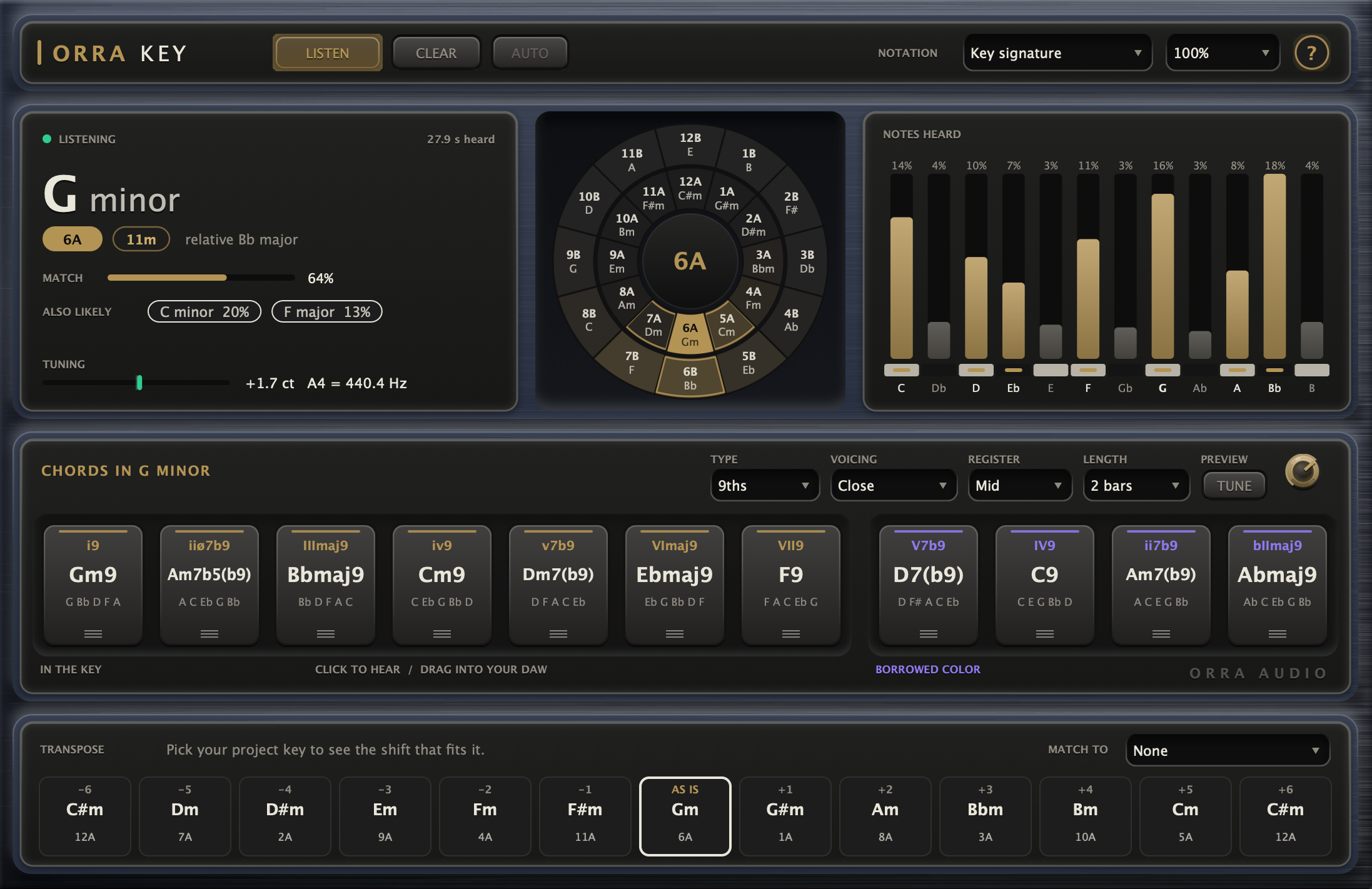
Press play and the key appears within a few seconds, with its relative, both DJ codes (8A / 8B and 1d / 1m), and a MATCH percentage calibrated against labeled loops so you can read it as a hit rate. ALSO LIKELY shows the next keys that fit, and a TUNING readout tells you how far the material sits from A440, in cents.
Play the chords
Eleven tiles: the seven chords of the key, plus four borrowed from neighboring modes for color. Click and hold to hear one on a soft electric piano. Drag it out and it lands in your DAW as a MIDI clip named after the chord, at your session tempo and time signature. Triads, 7ths or 9ths, in four voicings and three registers.
Make it fit
The transpose strip shows the key a sample lands in at every shift from minus 6 to plus 6 semitones. Pick your project key under MATCH TO and the shift that fits lights up gold, with the move spelled out in words. It reads the relative too, so a minor loop can sit in a major song.
A wheel you can click
All 24 keys, majors on the outside and minors on the inside, laid out so neighbors are musically close. It is the same numbering DJs use for harmonic mixing. Brighter keys are the likelier ones, the key in use is solid gold, and the keys that mix cleanly with it carry a gold outline.
Click any key to use it instead. The chords, the NOTES HEARD colors and the transpose strip all follow your choice, and AUTO takes you back to what Orra Key heard. You do not even need audio: click a key and explore the chords in it.
Beside it, NOTES HEARD shows twelve bars, C to B, with the key's scale notes in gold. A tall gray bar is worth a look: a borrowed chord, a bent note, or a sign that another key fits nearly as well.
Key detection
The key of what it hears, with its relative and both DJ code systems. A MATCH percentage you can read as a hit rate, and up to two ALSO LIKELY keys you can click to use instead.
Tuning readout
How far the material sits from A440, in cents, with the A4 it implies. Detune your synth to match, or pitch the sample back.
NOTES HEARD
Twelve bars showing how much of each note has been heard, with the scale notes of the key in gold and the home note in bold.
The key wheel
All 24 keys in two rings, shaded by likelihood, with the keys that mix cleanly outlined. Click one to work in it.
Chords of the key
Seven chords of the key and four borrowed from neighboring modes. Click to hear, drag out as MIDI.
Chord shaping
Triads, 7ths or 9ths. Close, Smooth, Open or + Bass voicings. Low, mid or high register. Clips of 1, 2 or 4 bars.
Transpose & MATCH TO
Thirteen shifts from minus 6 to plus 6 semitones with the key each lands on, and your project key highlighting the one that fits.
Stays out of the way
Zero latency, audio passes through untouched, and the analysis runs on its own thread. The result is saved with your session.
Orra Key is free
Pay what you can if you want to, and nothing if you do not. Grab a free license key, activate up to three computers, and keep it.