Six Slots, Six Sources: How Press + Link Reinvent Sidechain
The Sidechain Problem
Every modern DAW supports sidechain compression, but the workflow has barely changed in twenty years. You pick a compressor. You tell your DAW which track to listen to. You wire up the routing. And if you want a second compressor reacting to a different source? New instance. New routing. New mental overhead.
Want a kick to duck a bass? Easy. Want the same bass channel to also have its mids ducked by a vocal, while its highs get tightened up by a hi-hat trigger, all in one chain? You're looking at three plugin instances minimum, plus a routing diagram that takes longer to set up than the mix itself.
The traditional approach treats sidechaining as a one-to-one relationship: one compressor, one external source. But real mixes are full of interdependencies—and the tools haven't kept up.
Six Slots, Six Independent Sources
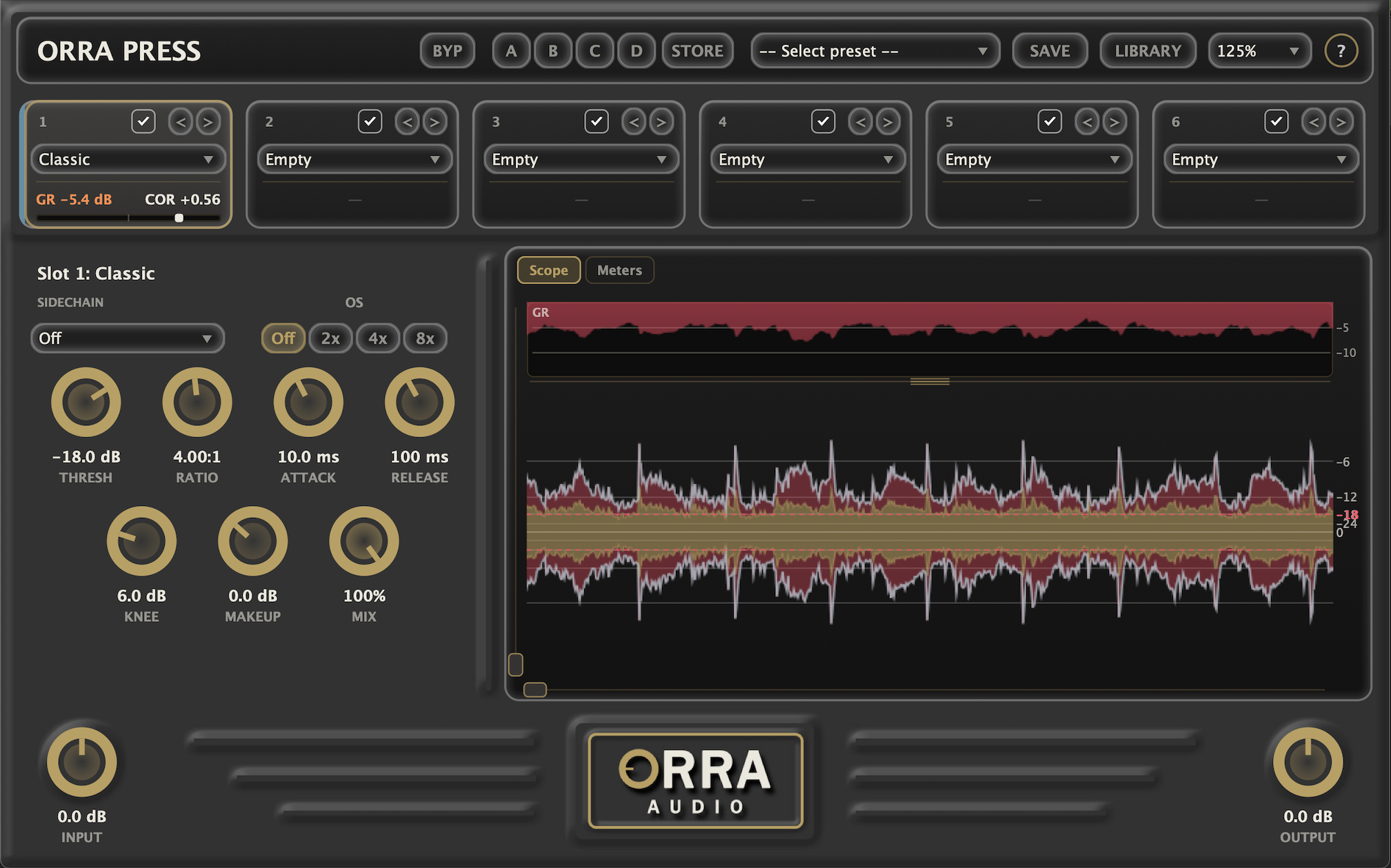
Press has six compression slots in series. What people miss until they try it is that every slot has its own independent sidechain configuration. Slot 1 can react to the kick. Slot 2 can react to the lead vocal. Slot 3 can stay internal. Slot 4 can react to a pad. All on the same track. All in the same plugin instance.
That's already unusual. Most multi-stage compressor plugins share a single sidechain input across all stages, which means you can't have one stage reacting to drums while another reacts to vocals. Press treats each slot as a fully independent processor.
Each Slot, Three Choices
Every slot lets you pick how it detects:
- Off: Detect from the slot's own input. Standard internal compression—what every plugin does by default.
- External: Detect from your DAW's sidechain input. Useful for the classic single-source workflow.
- Link: Detect from any live track in your session, picked by name, broadcast in via Orra Link 2. Numbered Link 1–36 channels still work too.
This is where things get interesting. Because once every track in the session is available by name, and any slot can listen to any of them, you stop thinking about routing and start thinking about behavior.
What Orra Link Actually Does
Orra Link 2 is a free sender-only companion plugin included with Press. Drop it on any track and that track's signal gets broadcast to every Press instance in your session, along with its name and color, so you can pick it by name. If you prefer a fixed routing, set a numbered channel from 1 to 36 instead.
That's it. There's no two-way handshake to configure, no bus to create, no aux track to route. The signal just becomes available everywhere Press is loaded.
A Different Mental Model
Traditional sidechain routing is plumbing. You build pipes between specific tracks and specific compressor inputs.
Press + Link is broadcasting. You publish a signal to a channel, and any compressor that wants to listen just tunes in. The compressor doesn't need to know where the signal came from—and the signal doesn't need to know who's listening.
Cross-Track Sidechaining Without The Headache
DAWs are notoriously inconsistent about sidechain routing between tracks. Some DAWs make it easy. Some DAWs require buses or aux sends. Some DAWs make certain routes impossible without bouncing audio.
Link sidesteps all of that. Once Orra Link is on a track, that track's signal is available to any Press instance anywhere in the session—no DAW routing required. Send your kick to channel 1, send your snare to channel 2, send your bass to channel 3. Now any Press instance on any track can react to any of those, in any combination, as many times as you want.
Where This Actually Pays Off
Multi-Source Vocal Bus
Stack a Press on your vocal bus. Slot 1 reacts to the kick (gentle ducking on hits). Slot 2 reacts to the snare (tightening up on backbeats). Slot 3 internal (general dynamics). Slot 4 reacts to a reverb return (pulling the wet signal down when the lead is forward). Four different relationships, one plugin.
Spectral Carving With Sidechain
Spectral compression already works per-frequency-bin. Add a sidechain trigger and you can carve a vocal into a busy mix at the exact frequencies where they conflict, only when the vocal is present. The vocal's own signal triggers the duck on the conflicting frequencies in the mix bus. This is a level of surgical control that's hard to do anywhere else without building a Rube Goldberg machine of buses and aux sends.
Stacking Spectral Within One Instance
Nothing stops you from loading Spectral into more than one slot in the same Press. Each instance is fully independent—its own threshold, ratio, attack, release, sidechain source, and oversampling. That means you can run two or three spectral compressors back-to-back, each handling a different job, all on a single track without spawning new plugin instances.
Slot 1 might be a transparent Spectral pass for surgical resonance control—no sidechain, just cleaning up problem frequencies. Slot 3 might be a sidechain-triggered Spectral that ducks specific frequencies when the kick hits. Slot 5 might be another Spectral set up for de-essing, listening to its own input. Three different spectral processes, three different jobs, all in one chain—and you can hear how each one builds on the previous because they're processing in series.
This is something the architecture quietly enables that most spectral plugins don't. Most are designed as a single-stage tool you stack via multiple plugin instances on a track. Press's slot system makes it native—stack as many as you need, configure each one independently, and let the series chain do the rest.
Mix Bus With Genre-Specific Triggers
On a mastering chain, slot 1 might react to a loudness reference (gentle program-dependent compression). Slot 2 might react to the snare for transient definition. Slot 3 might stay internal for traditional bus glue. The trigger source becomes part of the artistic decision, not a routing limitation.
Why This Approach Is Different
Most plugin developers treat sidechaining as a feature to support—a checkbox on the spec sheet. Press treats it as an architectural primitive. The plugin was designed from the ground up assuming that compressors should be able to listen to anything, multiple times, in flexible combinations, without forcing the user to build complex DAW routing.
That changes how you approach mixing. Sidechain stops being “the kick-and-bass trick” and starts being a tool you reach for whenever you want one element to respond to another. When the friction drops, the creative possibilities expand.
Getting Started
Orra Link is included with every Press purchase. To set up your first multi-source chain:
- 1.Drop Orra Link on any track you want to broadcast (kick, vocal, pad, reverb return—anything).
- 2.Pick a channel number (1–36). Use the same channel for the same source across the session—stay consistent.
- 3.Drop Press wherever you want compression. In any slot, set the sidechain mode to Link and pick the channel you want that slot to listen to.
- 4.Repeat per slot. Six slots, six different (or the same) sources—your call.
It's genuinely that simple. No bus to create, no aux to route, no DAW-specific quirks to navigate. Just publish and tune in.