Orra Tone Zone: Complete Feature Overview
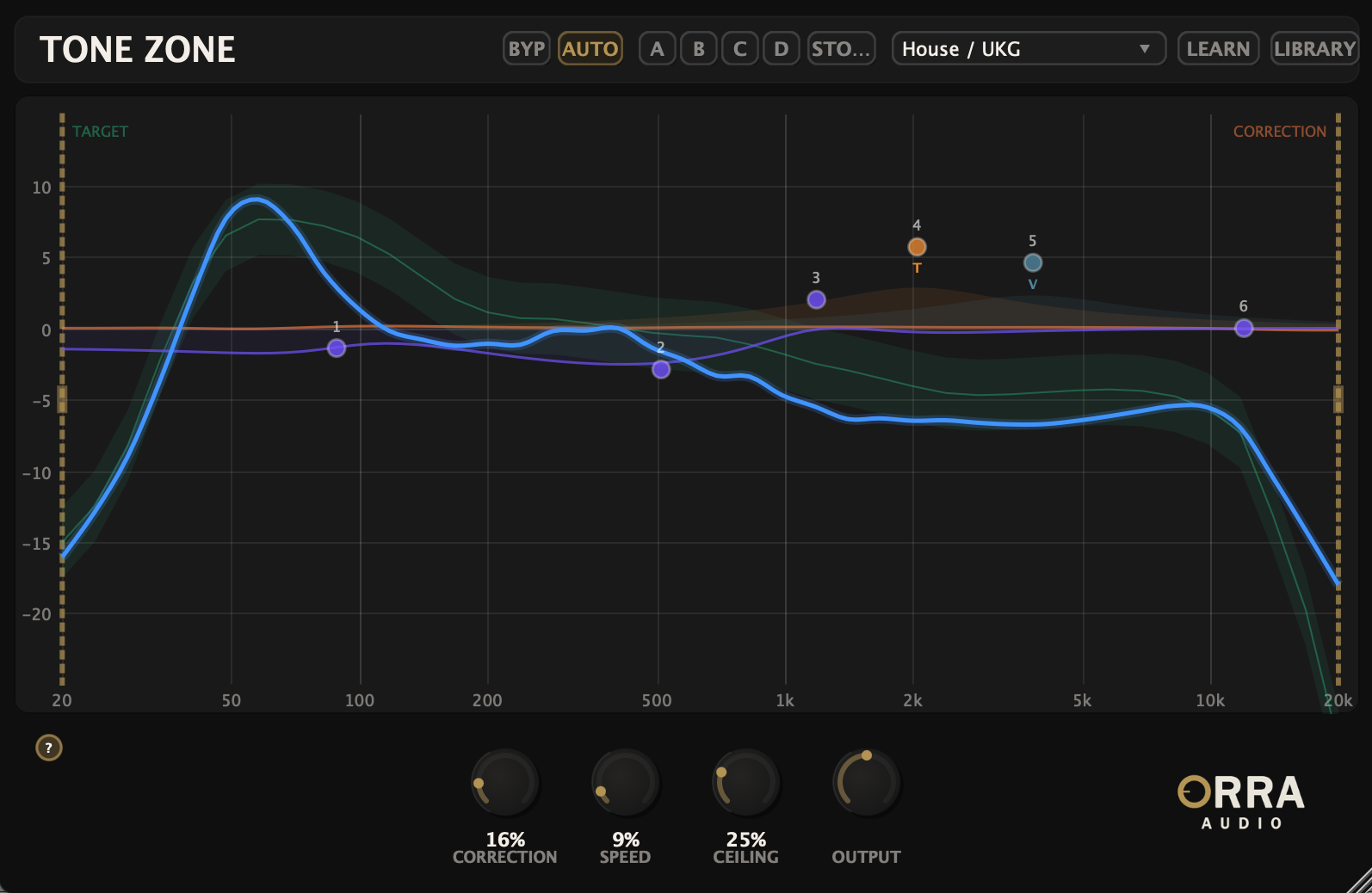
Target Curve System
24 Factory Genre Presets
Tone Zone ships with 24 factory target curves covering common production styles—from genre staples to mastering references. Each preset defines an ideal tonal shape (the spectral balance you're aiming for), and your mix gets compared against it in real time on the analyzer.
Reference Track Learning
Drag any audio file in and Tone Zone analyzes its tonal curve, building a custom target you can save and reuse. Use your own previous masters as references, match the tonal shape of a track you love, or build a library of references for different projects. Curves save in the .otzcurve format—shareable, reloadable, unlimited.
Smooth Spectral Analysis
The analyzer shows your mix's tonal curve overlaid on the target curve, smoothed across 40 log-spaced bands from 20 Hz to 20 kHz. Unlike standard real-time analyzers that show every momentary spike, Tone Zone's display is designed to show the shape of your mix over time—so you can see the actual tonal balance, not the instantaneous peaks.
Adjustable Analyzer Speed
Speed controls how quickly the analyzer reacts. Set it to glacial (long attack) for mastering—you want to see the whole song's shape settle in over time. Set it to reactive (short attack) for mixing—you want to hear the bass section shift when you tweak EQ. Same plugin, two completely different visualization workflows.
Automatic Corrective EQ
With AUTO engaged, Tone Zone's engine continuously nudges your mix's spectrum toward the target curve. It's subtle and transparent—not a heavy-handed correction, but a gentle ongoing adjustment that smooths the tonal balance over time. The correction curve itself is visible on the analyzer so you can see exactly what the engine is doing.
FFT Overlap-Add Processing
The correction engine uses 4096-point FFT processing with 75% overlap—the same approach used by mastering-grade tools like iZotope Ozone and FabFilter Pro-Q in linear phase mode. This produces the smoothest, most transparent correction available, with the trade-off of 7168 samples of latency (about 163ms at 44.1 kHz). Your DAW's plugin delay compensation handles this automatically on any track.
Correction Range Handles
Two draggable handles on the analyzer let you restrict auto-correction to specific frequency ranges. Want to correct only the lows? Drag the right handle inward. Want to leave the high end alone and only fix the midrange? Set both handles. The engine respects the range you set—everything outside it passes through untouched.
This makes Tone Zone equally useful for surgical work (correct just the problematic 200–500 Hz mud) and full-range mastering (correct the entire spectrum from 20 Hz to 20 kHz).
Manual EQ With Saturation
Six Parametric Bands
On top of the auto-correction, Tone Zone gives you a 6-band parametric EQ for hand-shaping. Each band offers Bell, Low Shelf, or High Shelf filter types, gain up to ±12 dB, frequency from 20 Hz to 20 kHz, and Q from 0.1 to 10.0. Use it to add color the auto-correction can't apply, or to override specific corrections you'd rather handle yourself.
Per-Band Saturation
Tube
Warm, even-harmonic saturation modeled after tube circuits. Adds body and air without aggression.
VCA
Cleaner, more transparent saturation drawing on VCA-style behavior. Useful when you want presence without coloration.
British
Console-flavored saturation with character. Adds the kind of subtle harmonic richness associated with classic British mixing consoles.
Each manual EQ band can have its own saturation type and amount independently. Boost a band, drive its saturation, and you're shaping tone and adding harmonic character in one move—not stacking a separate saturator after the EQ.
Workflow Features
A/B/C/D Comparison
Four full-state snapshots per instance. Try a heavier correction in B, a hand-EQ approach in C, a different target curve in D—then flip between them to hear which lands.
AUTO Toggle
Disengage auto-correction without bypassing the plugin. The engine keeps running with a flat correction curve, so latency stays consistent for reliable PDC—but the tonal correction is off.
Internal Bypass (BYP)
Bypass the entire processing chain while keeping the plugin active in the chain. Useful for instant A/B against the dry signal.
Fine Control
Hold a modifier while dragging any control to enter fine-adjust mode. Essential when you're dialing in subtle tonal moves at the mastering stage.
Toggleable Tooltips
Turn on contextual hints that explain what each control does. Turn off when you know the plugin and want a clean interface.
Drag-and-Drop References
Drop any audio file onto the plugin and Tone Zone learns its tonal curve as a custom target. No browser dialogs, no import workflow—just drag.
Visualization & Display
- •40-Band Spectral Analyzer: Log-spaced from 20 Hz to 20 kHz, smoothed across an 8192-point FFT with Hann window for clean readouts
- •Target Curve Overlay: Your selected target (factory or learned) drawn over the analyzer for at-a-glance comparison
- •Live Correction Curve: See exactly what the auto-correction engine is doing, in real time
- •Manual EQ Curve: Your hand-EQ moves drawn on the analyzer alongside the correction curve
- •Correction Range Handles: Visible draggable handles defining the active frequency range