Orra EQ: Complete Feature Overview
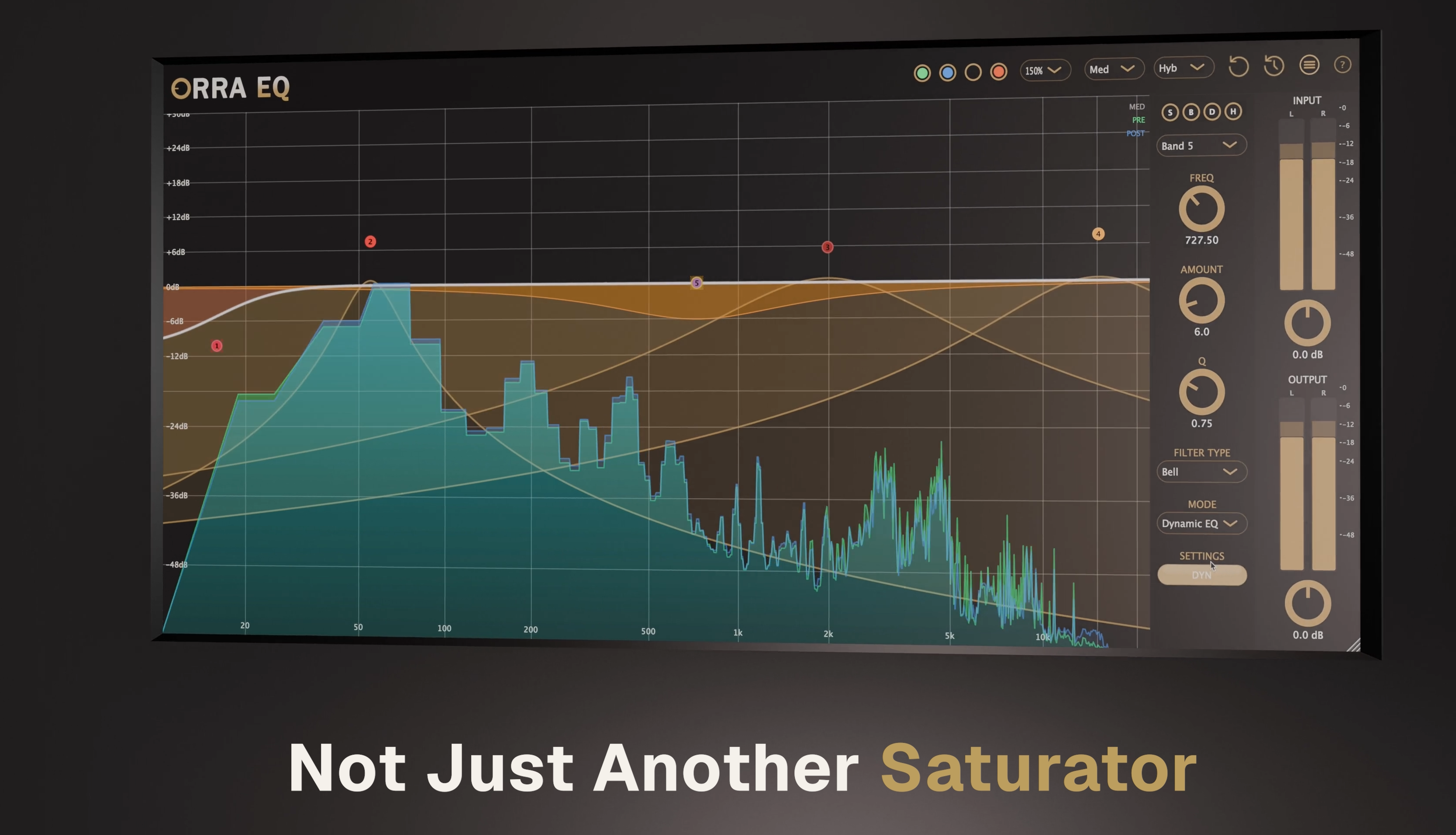
Core EQ Engine
16 Fully Parametric Bands
Each band offers complete control over frequency (10Hz–22kHz), gain (±60dB), and Q (0.1–40). Unlike fixed-band EQs, every band can be placed exactly where you need it with surgical precision or broad shaping capability.
Three Filter Types
- Bell: Classic parametric peak/cut for surgical or broad tonal adjustments
- High Shelf: Boost or cut everything above a frequency (12/24/36/48 dB/oct slopes)
- Low Shelf: Boost or cut everything below a frequency (12/24/36/48 dB/oct slopes)
Series-Chain Architecture
Bands process sequentially rather than in parallel. Band 1 feeds Band 2, which feeds Band 3, and so on through all 16 bands. This creates analog-style interaction where saturation, compression, and EQ moves accumulate and interact—something parallel EQs can't achieve.
Integrated Saturation
Orra Tube
Warm, even-harmonic tube saturation. Independent drive control (0-100%) plus dynamic saturation mode for upward compression-style processing.
Tape Saturation
Six authentic tape machine models with speed options and noise reduction (None, Light, Medium, Clean) for warm, musical saturation.
Saturation Models
Ten distinct algorithms: VintagePreamp, PowerTube, Transistor, DiodeGermanium, DiodesSymmetric, Wavefolder, BitCrusher, BritishConsole, VCAConsole, Exciter.
Oversampling (v1.2.1)
A global Oversampling control in the header (Off / 2× / 4×) reduces aliasing on any saturation band—Orra Tube, Tape, Models, and Dynamic Saturation. Use 2× or 4× when driving hard or working with bright source material; the setting persists with the project and has no effect on pure EQ or Dynamic EQ bands, which run at native rate.
Dynamic Processing
Dynamic EQ
Frequency-selective compression that reduces gain only when the signal exceeds a threshold. Controls include Attack (0.1-1000ms), Release (1-5000ms), Threshold (-60dB to 0dB), Ratio (1:1 to 20:1), and Amount (maximum gain reduction).
Dynamic Saturation
Upward compression for saturation—adds harmonics to quiet signals while leaving transients clean. Think of it as the opposite of a compressor: instead of turning down the loud parts, you're enriching the quiet parts.
Per-Band Sidechain & Orra Link (v1.2.1)
Every Dynamic EQ band has its own Sidechain source, set directly under the Channel selector. Pick what drives the band's level detector—independently per band:
- Off: the band detects on its own input—classic, frequency-conscious dynamic EQ for de-essing and resonance taming
- External: the band detects on the host's sidechain bus—route any track in to key the band from anywhere
- Link 1–36: the band detects on an Orra Link channel, working across busses and tracks regardless of DAW routing limitations
With External or Link, detection is wide-band and frequency-independent—moving the band's frequency only changes which frequencies get ducked, not what triggers it (the Pro-Q 3 / Pro-MB convention). Because each band is independent, you can duck the low band off the kick, the mud band off the snare, and the harsh band off the lead vocal—three sources, three dynamic moves, one plugin instance.
Orra Link is a free sidechain companion plugin that exposes 36 shared-memory sidechain channels. Insert it on a source track, set a channel number, and pick that Link channel in any Dynamic EQ band. If a sender stops, the band falls back to self-detection within ~340ms with zero added latency on the receiver side.
Workflow Features
Snap to Note
Right-click any band and snap its frequency to the nearest musical note. Orra EQ calculates the correct octave and snaps to any of the 12 chromatic notes (C, C#, D, D#, E, F, F#, G, G#, A, A#, B).
Double-Click Band Creation
Double left-click the frequency response curve to instantly create a new EQ band at that frequency. Double right-click to create an Orra Tube saturation band. Bands below 100Hz automatically become low shelves, and bands above 10kHz become high shelves.
Double-Right-Click for Orra Tube
Double-right-click the curve to create a band in Orra Tube mode, ready for saturation. Fastest way to add harmonic enhancement at a specific frequency.
Solo, Bypass, and Delta
Solo: Mutes all other bands to hear this band's effect on the whole signal. Bypass: Disable without losing settings. Delta: Hear only what the band is adding or removing.
Multi-Band Selection
Shift-click to select multiple bands, then change their settings simultaneously. Set all selected bands to the same mode, filter type, or slope in one action.
Hide Curve
Hide individual band curves to reduce visual clutter while keeping the band active. Useful when you have many bands and want to focus on specific ones.
Auto-Opening Settings Panel (v1.2.1)
Selecting a band auto-opens the right settings view for its mode. The panel is now permanent furniture—it never collapses, so the EQ display stays a constant width and band positions don't shift. Each band remembers its last visited tab; when no band is selected, a rotating tips carousel takes its place.
Piano View (v1.2.1)
A vertical scrollable piano on every band. The key matching the band's frequency glows green when in tune with a note, fading to yellow off-pitch, with a Hz / note / cents readout. Great for tuning drums and finding harmonic resonances.
Zones View (v1.2.1)
A vertical problem-zone strip—SUB, BASS, MUD, BOXY, BODY, HARSH, SIBILANCE, AIR—with a gold indicator showing where the band sits. A fast gut-check on what you're working on, and the default tab for EQ-mode bands.
Visualization & Analysis
- •Dual Spectrum Analyzer: Real-time FFT analysis showing both pre-EQ (green) and post-EQ (blue) spectrum
- •Individual Band Curves: Toggle visibility of each band's frequency response individually
- •Live Metering: Input/output gain meters, per-band gain reduction display, dynamic saturation activity indicators
Preset Management
Factory presets provide starting points for common mixing scenarios. Save and recall your own settings—presets store all 16 bands, their modes, saturation settings, and global parameters. A/B comparison lets you quickly toggle between two complete plugin states.